Your AI Agent Can Now Talk to Evercontact
Connect Claude, ChatGPT, Cursor, and other MCP-compatible AI agents to Evercontact. Search contacts, explore insights, check mailbox health, export data, and more using natural language.
Meet the new Evercontact MCP server
Your contacts contain more than names and email addresses. They reveal the people you know, the companies you interact with, the topics shaping your conversations, and the relationships that matter most.
Until now, accessing that intelligence meant opening a dashboard, applying filters, and reviewing the results yourself. Today, we are introducing a faster and more natural way to work with your Evercontact data.
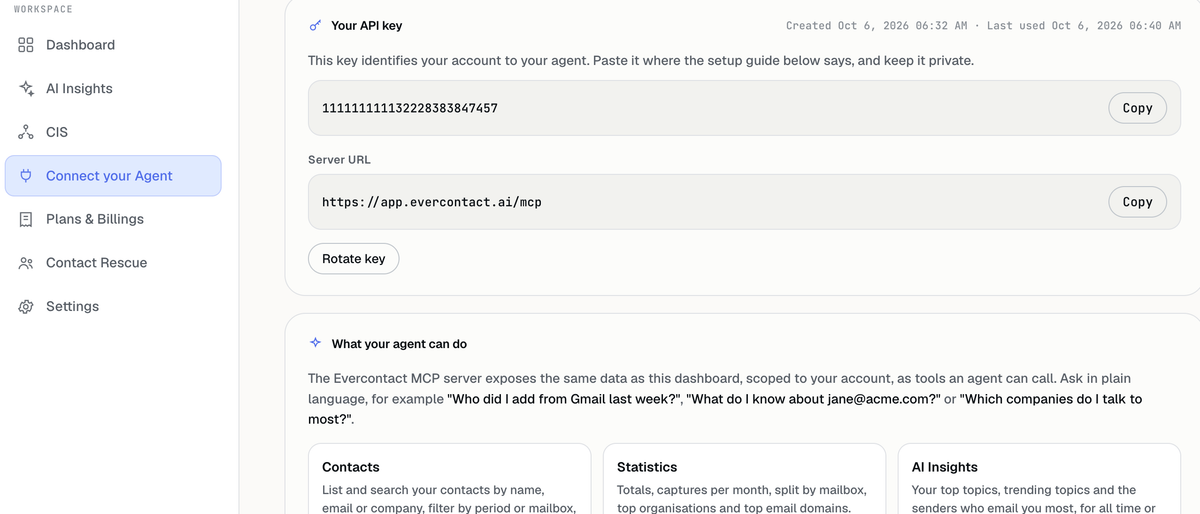
With the new Evercontact MCP server, you can securely connect your Evercontact account to Claude, ChatGPT, Cursor, and other MCP-compatible AI agents. Once connected, your agent can answer questions about your contacts, insights, connected applications, mailbox health, subscription, and more.
No complex queries. No digging through menus. Just ask in plain language.
What is MCP?
MCP, or Model Context Protocol, is an open standard that allows AI applications to connect to external tools and data sources in a consistent way.
Think of it as a secure bridge between your AI agent and Evercontact. It gives the agent access to the information it needs to answer your questions, while Evercontact continues to control what data is available and which actions are permitted.
The result is simple: your AI assistant can now understand your professional network through the contact intelligence already available in Evercontact.
Ask questions, get answers
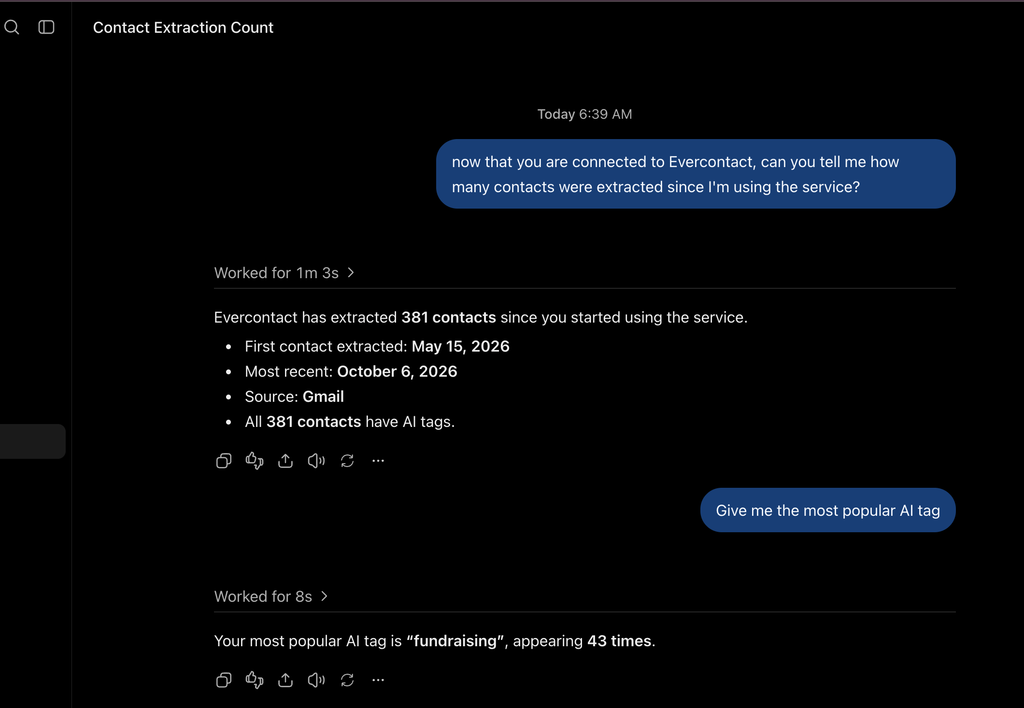
After connecting Evercontact, you can ask your agent questions such as:
- “Who did I add from Gmail last week?”
- “What do I know about jane@acme.com?”
- “Which companies do I interact with most?”
- “What are my most popular AI-related topics?”
- “How many contacts has Evercontact captured this year?”
- “Is my Office 365 mailbox connected and capturing contacts?”
- “Which application receives my newly captured contacts?”
- “Export the contacts added during the last 30 days.”
Your agent calls the appropriate Evercontact tools in the background and returns a clear answer directly in the conversation.
What your AI agent can access
The Evercontact MCP server provides account-scoped, read-only access to the same categories of information available through your Evercontact dashboard.
Contacts
Search and list contacts by name, email address, or company. Filter results by date range or mailbox, and retrieve all the details Evercontact has stored for a specific person.
Statistics
Review your total captured contacts, monthly activity, results by mailbox, top organizations, and most common email domains.
AI Insights
Discover your most frequent and fastest-growing topics, as well as the people who email you most. Insights can cover your complete history or focus on the last 7 or 30 days.
Connectors
See which contact intelligence system applications are connected, whether synchronization is enabled, and where newly captured contacts are being sent, including the relevant list or board.
Plan, billing, and team
Check your current plan, renewal date, and recent invoices. Team owners can also review seats and team members.
Contact Rescue
Follow the status and progress of a Contact Rescue job and retrieve its download links when the process is complete.
Mailbox health
Confirm whether Gmail or Microsoft 365 is connected, whether the authorization token is still valid, and whether contact capture is running correctly.
Exports
Create the same CSV exports available in the dashboard for any selected period. Depending on the AI client, the export can be provided as a download link or brought directly into the conversation.
Built for privacy and control
Connecting an AI agent to contact data requires clear safeguards. The Evercontact MCP server was designed with those safeguards at its core.
Access is read-only. Your agent can retrieve and analyze information, but it cannot create, modify, or delete anything in your Evercontact account.
Access is limited to your account. Your personal API key only provides access to the data associated with your Evercontact account.
Your key remains under your control. You can rotate it at any time from Evercontact. Once rotated, the previous key stops working immediately.
Access follows your subscription. The key stops working if the associated Evercontact subscription ends.
Your API key, or any connector link containing it, should be treated like a password. Never publish it, paste it into a shared conversation, or commit it to a code repository.
Works with the AI tools you already use
Evercontact provides guided setup for:
- Claude Code
- Claude.ai and Claude Desktop
- ChatGPT
- Cursor
- Other MCP-compatible agents
Setup requirements vary slightly between applications. Most clients use the Evercontact MCP server URL together with your personal API key. Some clients, including ChatGPT configurations that cannot send a custom authentication header, may use a personal connector link that already contains the key.
In every case, the connection remains personal to your Evercontact account and should never be shared.
How to get started
- Sign in to your Evercontact account.
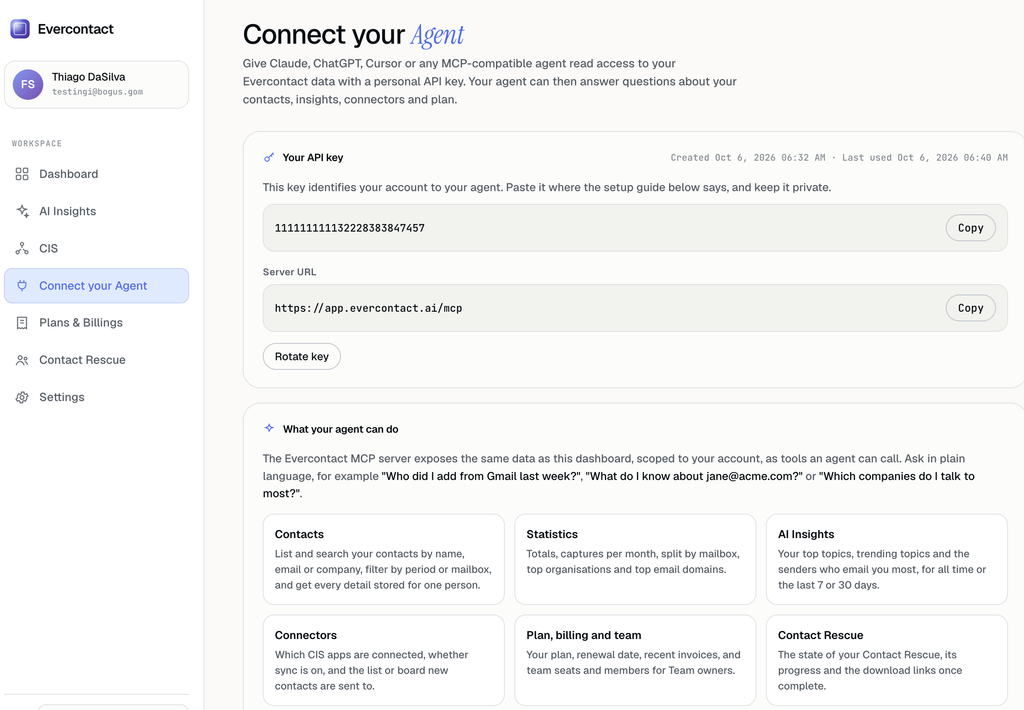
- Open Connect your Agent.
- Create or copy your personal API key.
- Select the setup guide for Claude Code, Claude.ai and Desktop, ChatGPT, Cursor, or another compatible agent.
- Add Evercontact to your AI application using the displayed server details.
- Start a conversation and ask your first question.
For example, try: “Which companies do I talk to most?”
Within seconds, your AI agent can turn your contact history into a useful, contextual answer.
Your network, now conversational
Evercontact has always helped professionals capture and organize the contacts hidden in their email conversations. With MCP, that intelligence becomes immediately accessible inside the AI tools where more and more work is happening.
Whether you are preparing for a meeting, reviewing your network, checking account activity, exploring communication trends, or exporting a targeted list, you can now begin with a question instead of a search.
Connect your AI agent to Evercontact today and start a conversation with your network.