Contact Management Advice from the Experts in our Community
At Evercontact we’re all about helping you improving your contact management by automating the data input process thus ensuring you always have the RIGHT contact info when you need it. From there, what you do with that data is an art in and of itself, and for that reason, I decided to reach out to some of our power-users and others in the community so that they could share their strategies, tips and hacks on how they optimize their interactions within their community.
First up to bat is Tod Maffin, President at engageQ digital, and someone whom I follow closely for his tips on social media strategy. Not only that, but his contact management tip is one that I identify with 1000% percent. Love live Baydin, maker of Boomerang! 🙂

BOOMERANG YOUR EMAILS
About a year ago, I stopped using my CRM system entirely, and replaced it with Boomerang. Boomerang is a great email service that plugs into Gmail. Once I compose a message to a prospect, I set Boomerang to track the email, and if they don’t reply within a given number of days or weeks, the email pops back into my email box. Quick, simple, and effective!

Next is a contact management strategy by Craig Elias – the Creator of Trigger Event Selling – that he says can generate more high-value leads than almost every other lead generation method combined. Craig says that decision makers who are new in their role are up to 10 times more likely to become your customer than a person who has been in their role for a year or more.
For example DiscoverOrg’s recent survey of IT executives, who were new in their role, showed that:
• 75% started 3 or more initiatives within a year– only 3% did not start any initiatives
• 42% spent at least $500,000 on new initiatives within their first 3 months
• 80% of those who would spend $1Mil or more on new initiatives did so within 3 months of starting their new job
To capitalize on the all the opportunities that a single job change brings, Craig suggests you:
• Follow your prospect to their new position – don’t wait for them to contact you
• Find out where the person they replaced went and call them too
• Contact the person who replaced your prospect at their previous position
• Find out where the person who took your prospect’s job came from because that company now has a vacancy and whoever fills that position will be new in their role and is now up to 10X more likely to become your customer

Craig has been sharing this strategy for years but he gives the folks over at DiscoverOrg.com credit for creating the above Infographic that explains this. He shared with me that if you track just 1,000 prospects and all the opportunities created by their job changes and all the follow-on job changes for just one year you would have a total of 2,700 high-value prospects who just changed jobs and are up to 10X more likely to become your customer.
Paul McNeal is one of our clients with whom I’m always bouncing off ideas as he is a perfect example of the “contact management” advice he gives below. Paul is the President at The Sturgeon Group and is active with teen entrepreneurs within the online community he created at TBF.
 Be Generous and Thankful.
A generous person will prosper. The person that refreshes others will themselves be refreshed. I know it can be challenging to be generous with your time, money, attention but if you do – I promise it will be well worth it and you won’t regret it.
Much like Paul, Bernie J. Mitchell, is another generous client with whom I interact fairly often. Bernie is an example to follow for online engagement, specifically blogging and he’s actually launching an exciting new course Blogging University as part of his professional activities as the head of Engaging People.

I love gadgets, social media and connectivity. The complaint I get from most people is “I just don’t have the time” or “it’s too impersonal” – you would be amazed at the amount of people who are still using Excel spreadsheets to manage contacts!!
- Using a CRM that is connected to social media platforms saves you so much time! All that jumping between platforms and logging into things, different groups of people my network communicate in different ways and these days all those contacts are online too.
- You can do all your social media and contact updating when you are on the go. I live in London and now we have wifi on the train system I check all my social there, when I sit down to work I switch on my RescueTime App and it blocks my email, hootsuite, twitter and other evil distractions. If anything is really really urgent someone will call and people don’t send “urgent” messages via Linkedin, People I work with know I don’t “live in my email” and I firmly believe we help develop how people communicate with us, if you make it clear you only check email once a day people will work that out
- I have never liked business cards, when I meet someone now I get them to email there and then, it gets picked up by Evercontact.
From there, Evercontact and Nimble CRM help me plan my week in advance, which allows me to focus on the right people and contact frequency. I don’t always keep to the plan but I know how to redirect myself if needed.
Also I am learning to use Google+ to share the right messages with people, this is much more humane than “Friend or Prospect”? There are people who I’ll never make a transaction with but we are vital to each other in the way we support each other. I think the world has moved beyond sending people an email on their birthday because your CRM told you to! 😉
Steve Dotto has been a well-known Tech host in Canada since the 90s and now he’s moved a lot of his activity online and on a few occasions, he’s been kind enough to wake up very early all the way over there in Vancouver while I wrap up my day in Paris, and we’ve collaborated on a bit of content for his stellar new online courses. Check out his 3 steps to inbox zero and another on Discover Massive Productivity. Always sharing hard-earned tips, Steve has a quick hack below to make sure you get your data synced the right way in each environment.
 Bulk importing email addresses.
Occasionally we have to import a group of people into our contact list. That list can be generated from a variety of sources but normally it’s delivered to us as a spreadsheet or a CSV file. Most contact management software has the ability to import a CSV file, but it is often trial and error getting all of the fields to correctly important.
My super ninja trick! Before you import email addresses take one of your contacts and export it to a CSV file. Then open that CSV file and into that CSV file copy the new content from, making sure you copy the correct information in each role, which is now nicely labeled.
Save the file, and when you imported into your contact manager, every field is in its correct place.
Kimberley Brink-Castleberry provides Social Media Expertise and wordpress consulting to her clients at Kimberley Castleberry Inc. Her tip below is indeed one of my favorite as well, right up there with boomerang as far as MUST-HAVE gmail plugins.

When it comes to managing your contacts, one thing you can’t leave out today is the social component. Being aware of where our connections are in the social world gives us more than just a generic data point though. It can make all the difference between a hasty and somewhat short reply to someone that hasn’t been responding in a timely manner… and a compassionate warm and open reply when we can observe that the individual is going through a death in the family even if they didn’t tell us.
Getting this information, and getting it into our CRM can be a major data collection project over time. However, there are lots of intermediary tools that can often present you with data on the fly. One example is Rapportive, a browser-based add-on for Gmail, owned by Linkedin. It replaces the ad-bar on the side of your email with a dynamic widget that queries the email address and looks for associated data on the person including their FB account (and most recent message if you are friends), Twitter account (and most recent tweet) and more. You can even make it show you what the last message the person received from your Aweber autoresponder account was.
Almost every modern CRM has the capabilities to provide you with fields in which to store at least the basic social URLs of the customer. Collecting and using these social signals can give you the inside hand to building rapport, developing influence with the individual, and ultimately closing more repeat sales with that customer in the future.
Patrick Sullivan Jr. and his team are launching a productivity app called Contatta and we’ve been exchanging back and forth as his platform quickly emerges into Beta. Patrick’s tip is one that I wish we could blast out very very wide, so everyone could speed up scheduling!
 “When is a good time to get together?” is not an efficient scheduling technique.
And far too often, too much effort is wasted in back-and-forth emails trying to find a date/time that works for two or more people. But you can make the process more efficient if you simply suggest two specific dates and times, like this, “Are you available Thursday(Nov 1) at 10a Pacific / 1p Eastern, or Friday (Nov 2) at 1p Pacific / 4p Eastern?”
About 50% of the time, one of the two proposed slots will be accepted. And if neither are available, you’re likely to receive a reply suggesting a different date and time because you were specific in the first place. Bonus tip: When you agree on a time, also send a calendar invite. That way, the appointment is on everyone’s calendar.
Here’s another way of saying it:
Bad Example
Bill: When is a good time to get together?
Sam: I’m generally free on Friday afternoons.
Bill: How about this Friday then?
Sam: Sure, what time?
Bill: I’m open after 3pm.
Sam: Let’s do it at 4pm.
Bill: Ok great. Talk with you then.
Good Example
Sally: Are you available Thursday (Nov 1) at 10a Pacific / 1p Eastern, or Friday (Nov 2) at 1p Pacific / 4p Eastern?
Jenn: Friday works.
Sally: Ok, just sent you a calendar invite. Talk with you then.
That’s 7 emails vs. 3.
I met Mark Goodson in an Evernote forum where he was sharing his hard-earned contact management wisdom and how Evernote applies to that. We exchanged ideas and I’ve started to follow his blog related to his consulting activities in sales and marketing.

Make sure that you capture all of the information from someone’s email sig. Oftentimes salespeople will automatically have someone’s email address saved after exchanging mail with them. They may have copied their phone number into their CRM tool or have it saved on their cell phone after calling them. But they ignore an email sig containing immensely useful information such as the person’s correct job title, division, landline, mobile, Skype address, Twitter username, and even the name and extension of their assistant.
From another up-and-coming startup in the CRM and marketing automation sector, Stewart Rogers heads up Salesformics, and below he shares a tip that rings oh so true, and one that I think many sales/marketing teams, especially startups, underestimate these days.

While a great CRM, contact manager or lead nurturing campaign might keep you in front of the client or prospect on a regular basis and allow you to record important information such as your prior communications with them and what sort of thing they like to get up to outside work, there’s one tool everyone is forgetting to use that delivers amazing results. Their voice.
If you only communicate with your audience through email, social media, instant message and other text-based systems, you’ll cause yourself problems and you’ll miss the big opportunities. Why? Research shows that email messages are misinterpreted almost 50% of the time*.
This means that if I write something to you, there’s a 1 in 2 chance you’ll read it ‘incorrectly’ and get the wrong end of the stick. And I’m using an English colloquialism on purpose to illustrate another point; if your audience is from another region where that phrase makes no sense, ‘wrong end of the stick’ may not only cause confusion, but could actually be offensive to them! It’s happened to me with a harmless English proverb and a customer in Poland. Guess how I fixed the misunderstanding? I picked up the phone and we talked.
Always record the following; your conversations, anything that can help you understand the sales environment and anything you feel might help you work well with the person or people you’re talking with – a simple CRM will help you here – and by all means keep you, your company and your products top of mind with relevant and timely text-based communications.
But to really move things forward, understand previously hidden opportunities, ask questions and get to the next stage, pick up the phone and talk to them (for a good reason – not ‘just because’).
*Peer-reviewed study published in the Journal of Personality and Social Psychology
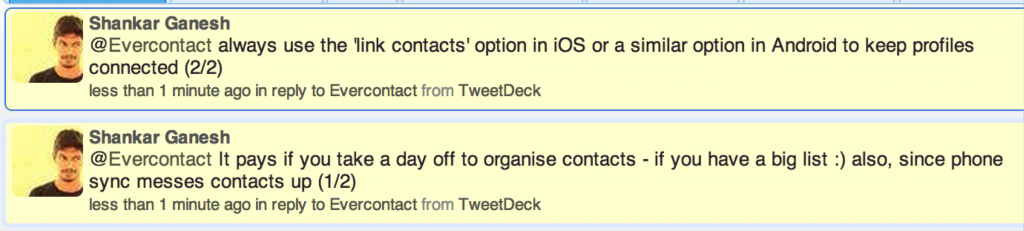
More advice came in on twitter from one of our beta testers from the early days and fellow startup-er, Shankar Ganesh whose idea I’ve definitely put into practice this past year (more here).
A BIG THANKS to all for their kind contributions, and I for one am excited to start rocking out these new ideas!!!
Cheers,
Brad
7 Comments
Comments are closed.


Thanks for asking me to contribute – some great tips and wisdom here from everyone involved.
Indeed, and thank you for helping make it happen, Stewart!
Brad, this is a great collection of tips! I especially like Craig Elias’ “trigger event selling” technique. Very insightful!
Thanks Patrick, and yes, Craig’s strategy could indeed be VERY fruitful. Thanks again for contributing!
Great article Brad. Keeping my eye on Contatta even though I had sworn off beta testing new apps 🙂 It’s as if contactually, nimble and zeromail have all got seriously involved with one another. I use scheduleonce to cut down on indecisive and lengthy communication regarding appointments but appreciate Patrick Sullivan Jr’s advice on how to minimise the time spent on this.
PS love the new evercontact – it’s brilliant and so fast!
Thanks for the kind words, Helen, and of course all the credit goes to our fine contributors!
Yes, we’re excited to see what Patrick and the team at Contatta come up with as well. Glad to hear that you’re enjoying Evercontact! Cheers, Brad
> as if contactually, nimble and zeromail have all got seriously involved with one another.
Helen, I love your analogy. 🙂 Yes, we’re building Contatta because we see an amazing opportunity to tie overlapping functions found in various productivity apps into a single app in a smooth and efficient way.
On that note, we’re still battling with a few “big rocks” internally at this point, so we’ve delayed public beta for awhile precisely because we don’t want to waste the time of good people like you who have much more important things to do than help us find bugs. 😉
So back to the “quarry” I go…