Productivity app of the week: @Rescuetime
Ever wonder how much time you REALLY spend on the computer?
Want to know much of that time is productive… or not?
Need an alert when you’re a bit too ‘distracted’?
Enter RESCUETIME, a personal analytics tool and my favorite new service of the summer.
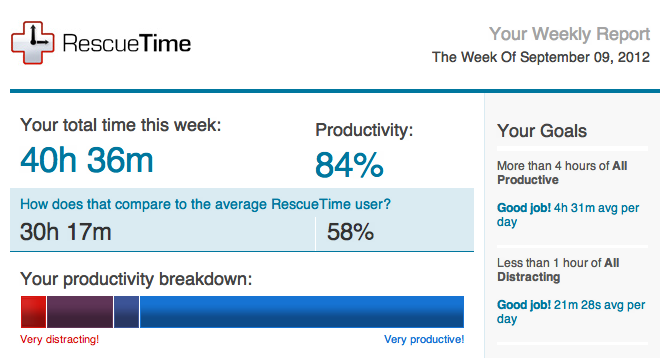
Rescuetime sends out a weekly email showing you how you spent your time, and gives you that global view you need to better understand how you might organize your time, and where you might need to pay more or less attention.
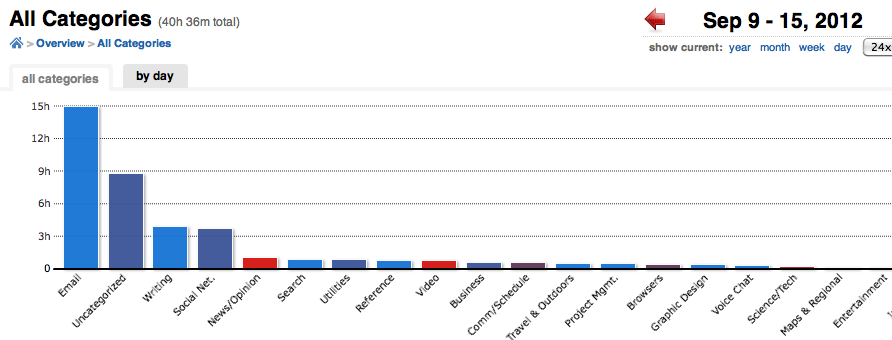
From there, it can get very specific on where exactly your time is spent:
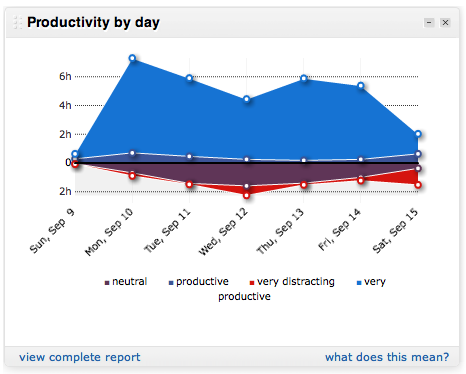
And you can see which days were most or least productive:
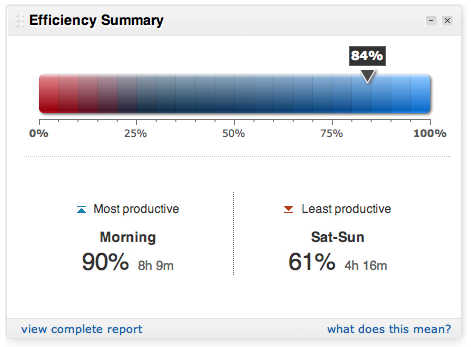
…which time of the day….
… how much time you’ve spent in the entire year with your various activities (premium to be able to see back more than a few weeks)
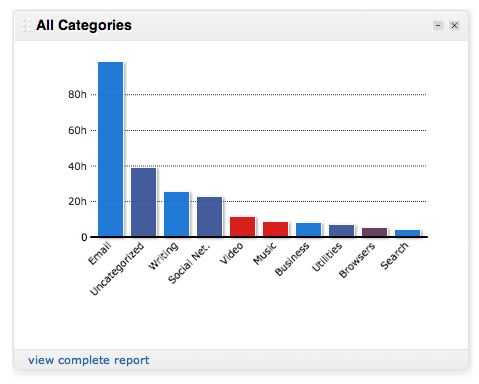
I upgraded for the last ability and also to be able to see specifically which activities within these activities were time-consuming— you can see exactly how much time you spend on details of each task, as well as set alerts for certain tasks if you think they’re becoming unproductive (for me that’s reading articles / videos / etc) and on their blog they talk about blacking out email for a few hours, though as a community manager between the WriteThatname users and the tech team, that’s not an easy one.
Also, I upgraded because it provided me value and even if the freemium version almost cut it, I wanted to support a team with a great product. A hat tip to the rescuetime team for developing such a great product, and as well to David Crow for giving me the heads up on this stellar app!
Go ahead! Try it here and let us know what you think!
Cheers, Brad
4 Comments
Comments are closed.



I personally compared RescueTime and ManicTime, them being my major contenders for personal time-tracking (not working, most major reports/business-related features go wasted for me).
Though at first ManicTime seems to be less automated one, RescueTime needs tweaking too, before becoming tuned for your workflow. So in reality you would spend some time configuring while having less control over how your data is interpreted (cause sometimes there are big (even in time) exceptions in what site/app should be considered – “good” or “bad”, “project X” or “project Y”)
For people oriented on control, it’s a major cons, as I can judge by my example.
Free version in ManicTime consumes even more time on defining groups for time spent if you work in huge chunks mostly, it’s a minor annoyance which can even be beneficial for you in providing some sort of function similar to that of journaling.Also, free version of RescueTime does not provide custom categories or even detailed reports by websites or documents, which limits it’s usefulness too much.
I’m quite cheap, yeah, because I’m quite poor and I pay mostly when something had already payed for itself, not to *maybe* get this value with paid-only features, *especially* artificially-restricted ones.Some insights RescueTime provides are good, maybe I’ll decide to buy it too(or, rather, subscribe), though it’s very pricey for what it takes outta free functionality.
Cheers for the comparison, Alexander.
I did need to tweak Rescuetime a bit, but just my personal perception of what was or not productive. Took a few minutes. Will have to look at ManicTime, though, having invested in Rescuetime, I’ll probably stick with them for awhile.
Cheers, Brad
[…] vision of your workflow and how email communications factor in. I’ve blogged before about Rescuetime and highly encourage you to check it out to see where you’re spending your time. In […]
[…] know in late August!). To track how you’re spending time your time differently, check out Rescuetime. (And of course, this doesn’t work for everyone as some have to be very reactive with […]